

Free rental property spreadsheet for landlords
A real Excel workbook — not a screenshot of one. Rent tracker, expense log with IRS Schedule E categories, and an annual summary that calculates itself. Built for residential landlords with a handful of doors. Download it free — no signup needed.
.xlsx · opens in Excel, Google Sheets, Numbers or LibreOffice · free, no watermark
Last updated September 2026
Pre-fill your properties (optional)
Names you add here become dropdown options on the rent and expense tabs, so every row stays consistent.
.xlsx · opens in Excel, Google Sheets, Numbers or LibreOffice · no signup
What's inside the workbook
Five tabs, every formula already written and every input cell colored blue so you always know what is safe to type over.
Properties
One row per rental with purchase price and the fixed monthly costs that never show up on a rent roll — mortgage P&I, property tax, insurance, HOA. Totals roll up automatically and feed every other tab.
Rent Tracker
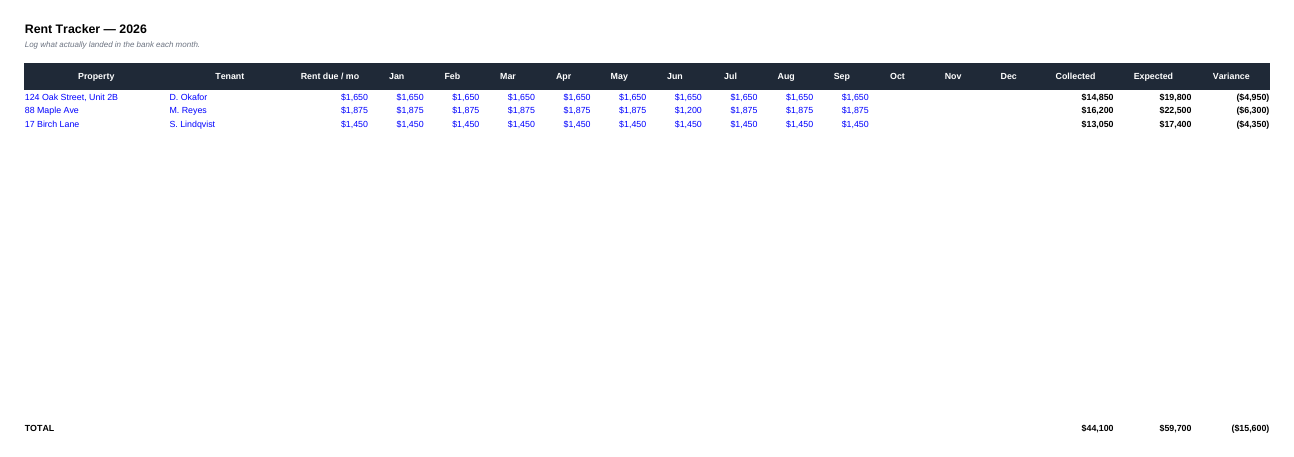
One row per tenant, twelve month columns. Enter the rent due once; log what actually arrives as it arrives. Collected, expected and variance columns compute themselves, so a short payment in March is visible in March instead of at tax time.
Expenses
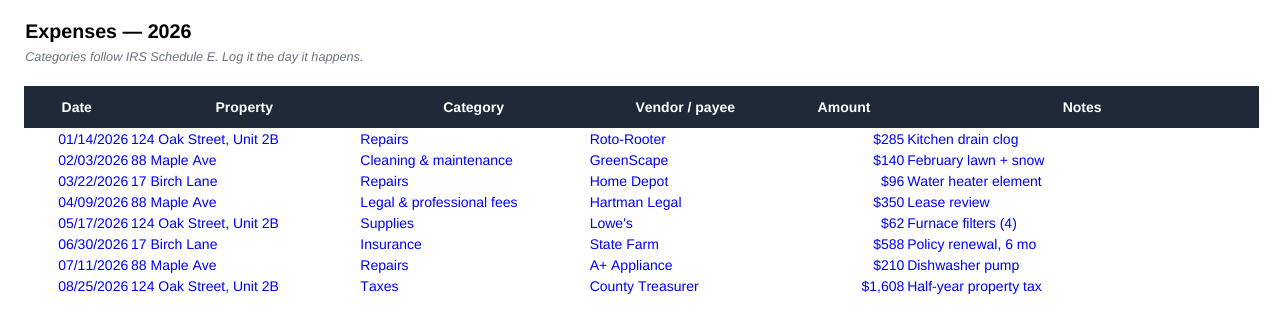
Date, property, category, vendor, amount, notes — 250 rows, with property and category as dropdowns so nothing gets miscategorized. Categories are the IRS Schedule E lines, not made-up buckets.
Annual Summary
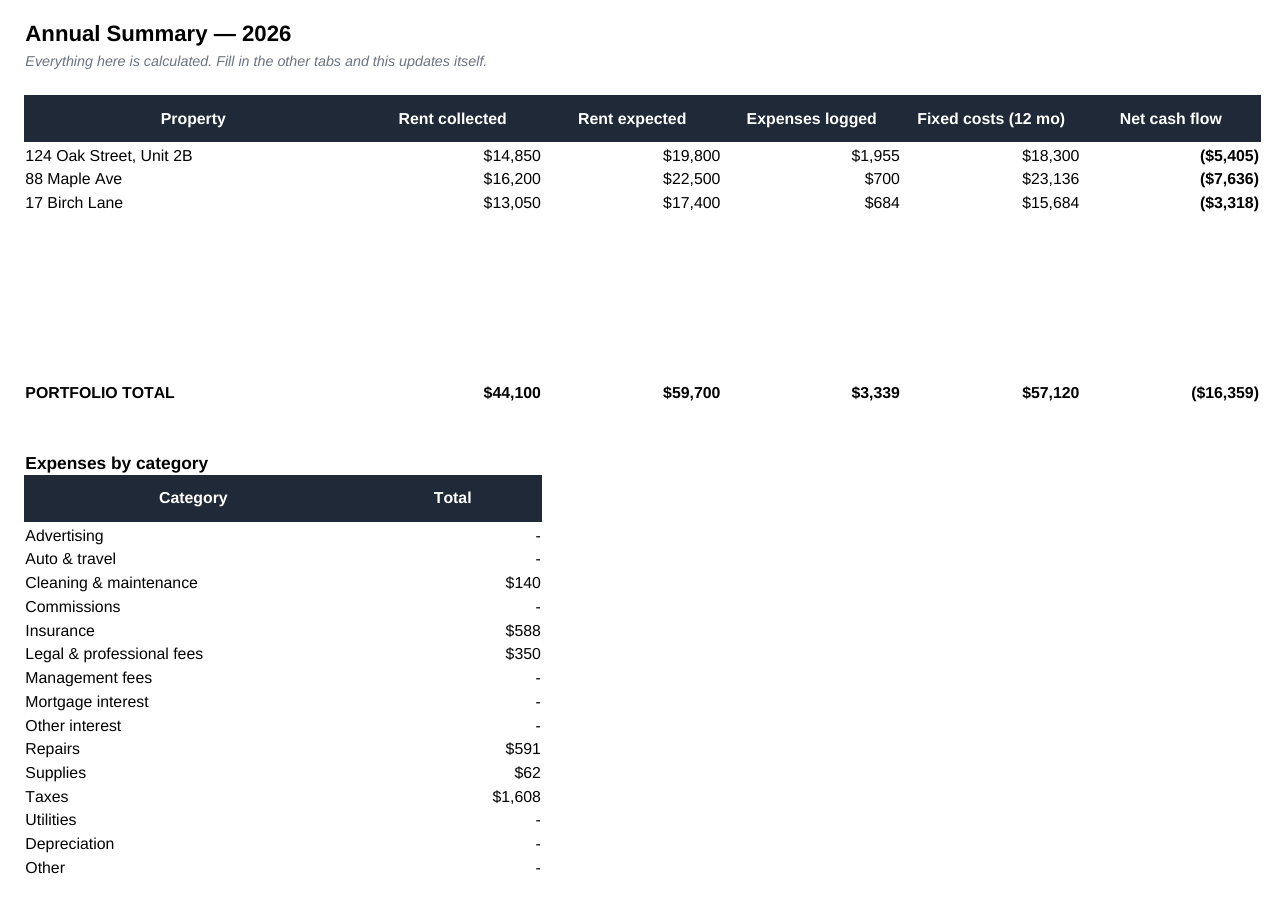
Rent collected, rent expected, expenses logged, twelve months of fixed costs and net cash flow — per property, plus a portfolio total and a full expenses-by-category breakdown. Entirely SUMIF-driven; you never type in it.
Start here
A one-screen explanation of the color key and the order to fill things in, so the workbook still makes sense in November when you have not opened it since March.
See the actual spreadsheet
These are real screenshots of the workbook filled in with a three-property example — not a mockup. What you download is exactly this, with your own property names pre-filled.

Where a rental property spreadsheet stops working
This is a good spreadsheet and it is genuinely free — but it is worth being honest about what a grid of cells can and cannot do for a residential landlord.
| The job | This spreadsheet | PLINTH |
|---|---|---|
| Record rent collected and expenses | Yes | Yes |
| Categorize for Schedule E | Yes | Yes |
| Net cash flow per property | Yes | Yes |
| Warn you a lease expires in 60 days | No | Yes |
| Track renewal + termination notice windows | No | Yes |
| Flag a tenant falling behind | Only if you look | Yes |
| Store the signed lease and documents | No | Yes |
| Give the tenant a portal to message you | No | Yes |
| Survive being emailed between three devices | Rarely | Yes |
The pattern we see over and over: the spreadsheet works fine until a lease auto-renews at last year's rent, or a notice deadline slips past. One missed renewal usually costs more than several years of software. PLINTH does this for you with no cut of your rent.
The formulas behind it — and how to extend them
Everything calculated in the workbook uses three ordinary functions — SUM, SUMIF and IF — so you can read, audit and extend every cell without deciphering anything exotic. The Rent Tracker's variance column is simply collected − expected; the Annual Summary is a set of SUMIF lookups that pull each property's rent and expenses out of the other tabs by name.
Because the formulas reference ranges rather than fixed rows, the workbook grows with you. Need a eleventh property? Insert a row on the Properties tab inside the existing block and the dropdowns and summaries pick it up. Want a column for late fees or pet rent? Add it next to the month columns and extend the Collected formula across it. Nothing is locked, protected or hidden — it is your file.
One deliberate omission: there is no depreciation schedule. Depreciation depends on your cost basis, placed-in-service date and prior returns, and a generic formula gets it wrong often enough to be dangerous. Log depreciation as an expense category so the totals match your return, but let your accountant compute the number itself.
How to set it up in ten minutes
- 1Fill in the Properties tab firstEverything else references it. Address, purchase price, and the four fixed monthly costs. If you do not know your exact tax and insurance split, use the escrow figure divided out — you can refine it later.
- 2Add one Rent Tracker row per tenantPick the property from the dropdown, type the tenant name and the monthly rent due. Leave the month columns empty; you will fill them as payments land.
- 3Log expenses the day they happenThe single habit that makes or breaks the whole thing. Two minutes on your phone beats four hours in April reconstructing the year from bank statements.
- 4Read the Annual Summary at month endFive minutes, once a month. If net cash flow on any property is negative and you did not expect it, you now know in month three instead of month twelve.
Excel, Google Sheets, or something else?
The file works the same in both, so the choice comes down to how you actually work. Pick Google Sheets if a spouse, business partner or bookkeeper also touches the numbers, or if you want to log a $180 plumbing bill from your phone in the driveway. There is one copy, it is always current, and version history means a bad edit is never permanent.
Pick Excel if you want the file on your own machine, faster pivot tables over a few thousand expense rows, and no dependence on a Google account. Just decide where the master copy lives before you start. The single most common way landlords lose a year of records is emailing the workbook to themselves, editing the attachment, and ending up with three versions that all disagree.
Either way, keep rental money in its own bank account. A spreadsheet reconciled against a dedicated account takes minutes a month; a spreadsheet reconciled against a personal account where rent, groceries and a car payment share a statement takes an afternoon and is usually wrong.
Five mistakes that ruin a rental spreadsheet
Recording rent when it was due, not when it arrived
If the cell says $1,800 every month regardless of what the bank shows, the spreadsheet is a budget, not a ledger. Log what actually landed, and let the variance column tell you the difference.
Mixing repairs with improvements
A $400 faucet repair is deductible this year. A $9,000 kitchen remodel is an improvement — it gets depreciated over years and adds to your cost basis. Dumping both into 'maintenance' is one of the fastest ways to file a wrong return.
Treating security deposits as income
It is money you are holding for someone else. Keep it out of the rent column and out of your income total, and keep the bank record of where it sits.
Forgetting the costs that never invoice you
Mortgage principal and interest, property tax, insurance and HOA usually leave the account quietly on autopay. Left out, a property that loses $120 a month looks like it earns $900.
Only looking at the portfolio total
Three profitable units can carry a fourth that has been negative all year, and the combined number will look fine right up until you sell the wrong one. Read the per-property rows.
A fifteen-minute monthly routine
Bookkeeping fails because it is treated as an annual event. Put a recurring calendar block on the first weekday of each month and do four things: mark the rent that arrived, enter any expense receipts still sitting in your inbox, reconcile the total against the bank statement, and read the Annual Summary row for each property.
Then look one line further than the numbers — at dates. Which lease expires within ninety days? Whose renewal notice window opens this month? Who is now two payments behind? A spreadsheet will never raise its hand about any of that, which is why the habit matters more than the template, and why renewal deadlines are worth tracking somewhere that reminds you.
Come tax season, the payoff is that nothing needs reconstructing. Your categories already match Schedule E lines, the per-property totals are already netted, and your accountant gets one file instead of twelve months of guesswork.
Rental property spreadsheet FAQ
- What should a rental property spreadsheet track?
- Four things, and most free templates only do two. First, the property itself and its fixed monthly costs — mortgage principal and interest, property tax, insurance, HOA. Second, rent due versus rent actually collected, month by month, per tenant. Third, every expense with a category that maps to IRS Schedule E, so your accountant is not reconstructing the year from a shoebox. Fourth, a summary that nets it all out per property, because a portfolio total hides the one unit that is quietly losing money.
- Is this rental property spreadsheet really free?
- Yes, the spreadsheet is completely free with no watermark and no account needed. You get an .xlsx file that opens in Excel, Google Sheets, Numbers or LibreOffice. You own it, you can edit every formula, and nothing phones home.
- Does it work in Google Sheets?
- Yes. Download the file, then in Google Drive choose File → Import → Upload. All the formulas (SUM, SUMIF, IF) are standard and carry over. The dropdown lists for property and expense category carry over too.
- How do I track rent payments in Excel?
- Put one row per tenant and twelve columns for the months. Enter the rent due once in its own column, then type what actually arrived in each month's cell as it lands. A variance formula — collected minus expected — tells you instantly who is short and by how much. That is exactly how the Rent Tracker tab in this workbook is built, and the variance column is already written for you.
- What expense categories should I use for rental property?
- Use the IRS Schedule E lines so tax time is a copy job rather than a translation job: advertising, auto and travel, cleaning and maintenance, commissions, insurance, legal and professional fees, management fees, mortgage interest, other interest, repairs, supplies, taxes, utilities, depreciation, and other. The Expenses tab has these as a dropdown so you cannot fat-finger a category and lose the deduction.
- When should a landlord stop using a spreadsheet?
- A spreadsheet is a record of what already happened. It cannot tell you that a lease expires in 60 days, that a renewal notice window closes next week, or that a tenant is now two months behind — it only knows what you remembered to type. Most landlords hit that wall somewhere between three and eight doors, or the first time a lease auto-renews at last year's rent.
- How many properties does the template handle?
- Ten properties and twenty-four tenants out of the box, with 250 expense rows. Every formula uses ranges rather than hardcoded values, so you can insert rows and extend the ranges if you outgrow it.
- Excel or Google Sheets for rental property tracking?
- Google Sheets if more than one person touches the numbers, or if you want to log an expense from your phone at the hardware store — it is always current and there is only ever one copy. Excel if you want faster pivot tables, offline access and a local file you control. The workbook here is built to work identically in both: no macros, no Excel-only functions, no add-ins.
- How do I calculate rental property cash flow in a spreadsheet?
- Rent collected minus operating expenses minus fixed monthly costs (mortgage principal and interest, property tax, insurance, HOA). Do it per property, per month, and never per portfolio only — a portfolio total hides the one unit bleeding cash. The Annual Summary tab does this arithmetic for you from what you typed on the other tabs.
- Should I track the security deposit in the spreadsheet?
- Track it, but never as income. A deposit is money you are holding, not money you earned, and in many states it has to sit in a separate account with interest passed through. Log it as a note on the tenant row and keep the bank record; putting it in the rent column overstates your income and your tax bill.
- How long should I keep rental records?
- The IRS generally has three years to audit a return, six if income was substantially understated. Most landlords keep seven years of ledgers and receipts, and keep purchase and improvement records for the entire time they own the property plus three years after the sale, because those figures set the cost basis used to calculate capital gains. Spreadsheets are easy to lose across laptops — back the file up somewhere permanent.
- Can I use one spreadsheet for multiple rental properties?
- Yes — that is exactly what the property dropdown is for. One workbook, ten properties, with every summary broken out per property as well as totaled. Do not keep a separate file per rental: the moment you do, you lose the portfolio view and you will forget which file has the current numbers.
- Do I need accounting software instead of a spreadsheet?
- Not for one to five doors with simple finances — a spreadsheet plus a dedicated bank account handles it. Consider software when you are juggling deadlines rather than numbers: lease expirations, renewal notice windows, late rent, maintenance requests and documents. That is a calendar problem, and spreadsheets have no calendar.
More free tools for landlords
When the spreadsheet stops keeping up
When you want a second opinion on a specific deal, run it through PLINTH's free deal analyzer — cap rate, cash flow and cash-on-cash return in seconds, plus a $10 full financial report when you want the numbers behind the verdict.